Mozilla SOPS
SOPS is an editor of encrypted files that supports YAML, JSON, ENV, INI and BINARY formats and encrypts with AWS KMS, GCP KMS, Azure Key Vault, age, and PGP
What is SOPS
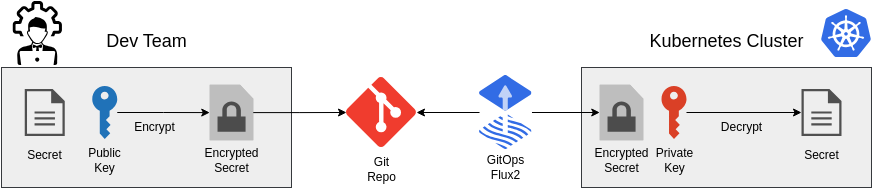
Mozilla SOPS is used to encrypt secrets to be stored publically in a GIT repository. The secrets are pulled by our GitOps Operator flux2 and decrypted using the private key that is stored in the cluster. For encryption a multitude of providers can be used: PGP, age, or a centralized secret management engine. Among th usable engines there is GCP KMS, Azure Key Vault, Hashicorp Vault, or AWS KMS
What does it actually do
SOPS encrypts your secret data and stringData fields for kubernetes using a private key. This makes them accessible to persons with the matching private key only. This should be - of course - your cluster.
kubectl create secret generic sopstest --from-literal=foo=bar -o yaml \
    --dry-run=client | tee sops-test-secret.yaml
And here is what the created secret looks like:
---
apiVersion: v1
data:
  foo: YmFy
kind: Secret
metadata:
  creationTimestamp: null
  name: sopstest
sops -e sops-test-secret.yaml | tee sops-test-secret-encrypted.yaml
---
apiVersion: v1
data:
    foo: ENC[AES256_GCM,data:UZY1VQ==,iv:54ce6xcRc28sjBQU4OjvbBUkvFhs4UKxaM8lOQtsbI4=,tag:Ms906PUkzSgNVpV2A2oG9Q==,type:str]
kind: Secret
metadata:
    creationTimestamp: null
    name: sopstest
sops:
    kms: []
    gcp_kms: []
    azure_kv: []
    hc_vault: []
    age:
        - recipient: age1w8dts3ptgqsqac60z8v2asney6akyktad43k5reguj5suj6y83rstgyh8v
          enc: |
            -----BEGIN AGE ENCRYPTED FILE-----
            YWdlLWVuY3J5cHRpb24ub3JnL3YxCi0+IFgyNTUxOSBCM2prVitpS09wY3Q4NFpZ
            eVlEc0xnOHRxT0poSk0wSWwrMDM2QVRJbjJRCjBMTjhiU1BwYWYwbVo5bWZlTjVF
            c3Z6QXdNekM4Y0wrcGVNZ052VUR3MDgKLS0tIFo5dGNyM2Nxb2NVNm5odzkwNVJs
            T1BXK0JhN3lKK0VaZTZTWUhyTHF0aWMKZtB5/fOeyjTy4FCkmlfn15OPabe0VKeZ
            rJMdx3MyF+RDQZHjs9nk9drb2bnAZ2ew1uwx31DkayhGDGF3rpk+oA==
            -----END AGE ENCRYPTED FILE-----
    lastmodified: "2022-04-19T19:50:20Z"
    mac: ENC[AES256_GCM,data:Hhu+4TxpI5Vpi4ZSXI79Lw+wEaZ6HxwfCTyRg6kExCBLHLJbULEfug11VTMrbMz6hpLnaRqBkq/FqLWqcxphzwTJ37p7OMeEtm7c7fN//t1sGjF96TP3MyqRypDbIFQCOPXEpnegASpis5HHLCLkvELXwyd/ucHlQs7gTUTzT4g=,iv:ssAD21AJ+wZr+XqrdZlRKmJeHbF5Sop5SGC8kAlQF+E=,tag:xZQvQltcb3wSnS5nQOjBFg==,type:str]
    pgp: []
    encrypted_regex: ^(data|stringData)$
    version: 3.8.1
Installation
I am using "age" to encrypt and decrypt the secret files as it it small, quick and secure. It does not come with the overhead of GPG keys as we only want a private and a public key without any scopes or additional features.
SOPS and age
SOPS and age a open source tools and be installed easily using the following commands for ubuntu:
curl -L https://github.com/mozilla/sops/releases/download/{version}/sops-{version}.linux.amd64 > /usr/local/bin/sops
chmod +x /usr/local/bin/sops
Additionally we need age as it is used to encrypt and descrypt the secrets. It acts as a plugin to SOPS and can be interchanged and used alongside all the other options available for SOPS.
Fortunately, for Ubuntu there exists an up-to-date package:
sudo apt-get install age
Usage
Create a key-pair
Age creates a public and private key-pair using the following command:
age-keygen -o keys.txt
Obviously the private key should be stored securely somewhere on your disk/password manager. OR, it should only be available on your cluster - if you want to feel extra save.
In order to simply encrypt and decrypt files on your local development machine, copy the created text file to your home directory
cp ./keys.txt ~/.config/sops/age/.
This way all sops commands using age will be using the stored key in your user config.
Encrypt secrets
sops -e --in-place {filename}
Enable SOPS on the cluster
---
apiVersion: kustomize.toolkit.fluxcd.io/v1
kind: Kustomization
metadata:
  name: apps
  namespace: flux-system
spec:
  interval: 10m0s
  dependsOn:
    - name: infra-configs
  sourceRef:
    kind: GitRepository
    name: flux-system
  path: ./apps/production
  prune: true
  wait: true
  decryption:
    provider: sops
    secretRef:
      name: sops-age
Decryption on Cluster
To decrypt the cluster needs to know the private key. This is done by creating a simple secret utlizting the previously created 'keys.txt'
kubectl -n flux-system create secret generic sops-age \
  --from-file=age.agekey=keys.txt
Adding default rules for flux2 repositores
SOPS can utilize configuration files to recusrivly configure the encryption of secret files in all subdirectories. The SOPS cli client will automatically scan through the parent directories and use the information to encrypt files automatically with the configured age public key.
creation_rules:
  - encrypted_regex: '^(data|stringData)$'
    age: age1wnvnq64tpze4zjdmq2n44eh7jzkxf5ra7mxjvjld6cjwtaddffqqc54w23
Decrypt secrets
sops -d --in-place --ignore-hmac secret.yaml